Emma arrives. Her father checks her in at the kiosk.
She is in, with the time and the name of the adult who brought her. Reception sees it on their tablet, the Penguins class on theirs, and the day has begun.
Check-in kioskFrom the first arrival to the last pickup, each moment is recorded once, by the person who was there, in one shared record. Scroll to watch a day take shape.
She is in, with the time and the name of the adult who brought her. Reception sees it on their tablet, the Penguins class on theirs, and the day has begun.
Check-in kioskLucas is marked absent after his mother called. Each class shows who is present, who is still expected and which staff are on the floor, so the director knows before anyone has to ask.
Classes and ratiosEmma’s peanut allergy is on the meal sheet before the food reaches the table. Ate well, ate some, did not eat: one tap per child.
Day sheetStart, end, mood. Nothing is typed twice: everything the class records today becomes the daily report each family reads tonight.
Day reportsAt pickup, the kiosk checks every adult against the child’s authorized list. Anyone who is not on it is stopped at the door, and the director is told.
Authorized pickupsThe daily report goes out on its own. At month end, each contract produces its invoice, prorated in the first and last month, without anyone typing it.
BillingAttendance, classes, daily care, families, billing and the books: the work a center does today on paper and in spreadsheets, in one product.
Search, confirm, done, on a tablet by the door. At pickup, the kiosk checks the adult against the authorized list and stops anyone who is not on it.
Who is present, who is expected and which staff are on the floor, class by class. When a ratio slips, the director sees it first.
Meals, naps, diapers, mood and activities, recorded in the classroom and sent to each family as one short report at the end of the day.
Schedule, rate, meals, sibling discounts and subsidies are set once in the contract. Invoices follow every month, prorated in the first and last month.
From first inquiry to visit to signed contract, each family moves across one board, with its notes, documents and messages.
Allergies and medication at hand in every class. An incident goes from educator to director to parent, who acknowledges it, and the record stays.
The dashboard of a demo center on a real morning: who is in, who is expected, and what needs someone today. Each line opens the screen where it gets fixed.
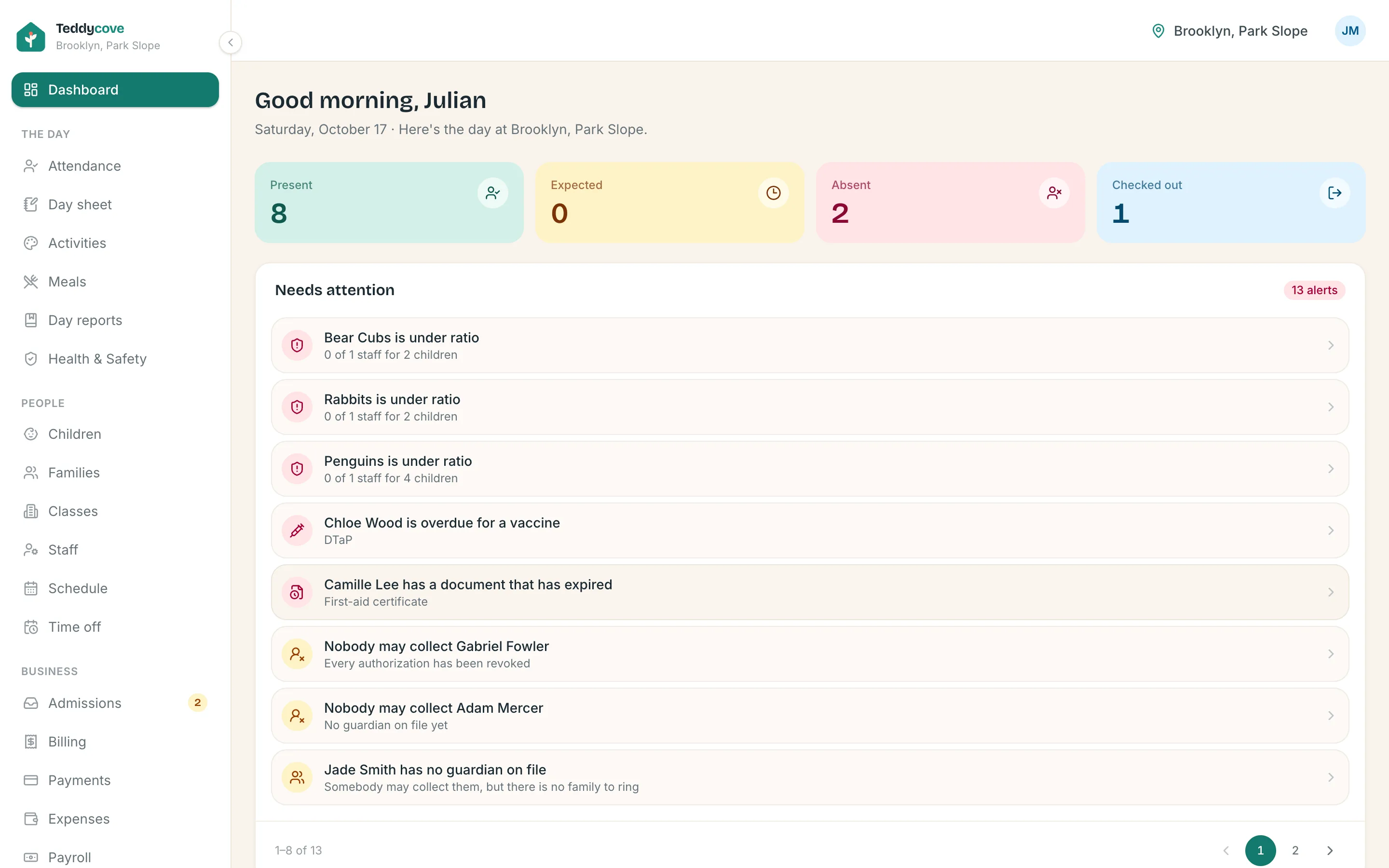
The product on a demo center: the dashboard, the tablet at the door, the day in the classroom, admissions, billing and the family portal.
5 min · narrated in English
You will talk to the people who build it, and what you ask for shapes the next release. We would rather show you than tell you: the screenshot and the tour above are the real product, not mock-ups.
This space is for our first director’s words, once we have earned them.
Permissions are checked on the server, not just hidden from the menu. Health and money stay with the roles that need them, and every sensitive access is logged.
Every center, every figure, in one view. The subscription, the users, the books.
One center, end to end. Classes, staff, admissions, rates, and the unpaid invoices to follow up.
Journals, taxes, closing dates and bank statements, matched line by line. Names, never health records.
Arrivals and pickups, families, appointments, documents, and what a parent owes when they ask.
Their own class only. Attendance, meals, naps, activities, incidents, notes and messages to parents.
Their own children only. Today’s report, attendance history, invoices and receipts, and who may pick up.
Dense tables, filters, saved views, bulk actions and a command palette, for the director and the accountant.
Big buttons, little typing. Attendance, meals and naps in a few taps, and the kiosk at the door.
One child at a time. Today’s report, the next invoice, and the people allowed to pick up.
No price per child, per tablet or per user. Each open center pays one fixed amount, and everyone works in it: the director, the team, the accountant and the families.
One center, one price. A group pays for each center it has open, and nothing for one that is closed.
Every feature in your plan, for every role: the kiosk, the day sheet, billing, the books and the family portal. No seats to buy, no paid add-ons.
One flat amount each month, in dollars, and nothing to pay to start: we set up your center with you, and the first month is free.
Three plans by the number of enrolled children, from $79 a month, and the first month free while we set up together.
See the pricingThe six questions we hear most, answered plainly.
A forty-minute demo on a center set up like yours. Bring your director and whoever handles the invoices.
Not ready to talk yet? Watch the tour first.